
VBA Statements: The Building Blocks of VBA Programs
VBA programs are nothing but a sequence of VBA statements. They are the cornerstone of VBA programs. Here, we explore these vital elements of VBA coding.

VBA programs are nothing but a sequence of VBA statements. They are the cornerstone of VBA programs. Here, we explore these vital elements of VBA coding.
![The While – Wend statement’s syntax. Square brackets, [ ], indicate optional items.](https://masterofficevba.com/wp-content/uploads/2021/03/While_Wend_Statement_Syntaxnew.png)
VBA programs often include repetitive execution paths. The While – Wend statement enables such loops. Here, we explore this crucial code construct in-depth.
![The Do – Loop Until statement’s syntax. Square brackets, [ ], indicate optional items while vertical bars, |, indicate mutually exclusive items.](https://masterofficevba.com/wp-content/uploads/2021/03/Do_Loop_Until_Statement_Syntaxnew.png)
VBA programs often include repetitive execution paths. The Do – Loop Until statement enables such loops. Here, we explore this vital code construct in-depth.
![The Do – Loop While statement’s syntax. Square brackets, [ ], indicate optional items while vertical bars, |, indicate mutually exclusive items.](https://masterofficevba.com/wp-content/uploads/2021/03/Do_Loop_While_Statement_Syntaxnew.png)
VBA programs often include repetitive execution paths. The Do – Loop While statement enables such loops. Here, we explore this crucial code construct in-depth.
![The Do Until – Loop statement’s syntax. Square brackets, [ ], indicate optional items.](https://masterofficevba.com/wp-content/uploads/2021/03/Do_Until_Loop_Statement_Syntaxnew.png)
VBA programs often include repetitive execution paths. The Do Until – Loop statement enables such loops. Here, we explore this vital code construct in-depth.
![The Do While – Loop statement’s syntax. Square brackets, [ ], indicate optional items.](https://masterofficevba.com/wp-content/uploads/2021/03/Do_While_Loop_Statement_Syntaxnew.png)
VBA programs often include repetitive execution paths. The Do While – Loop statement enables such loops. Here, we explore this crucial code construct in-depth.
![The For Each – Next statement’s syntax. Square brackets, [ ], indicate optional items.](https://masterofficevba.com/wp-content/uploads/2021/03/For_Each_Next_Statement_Syntaxnew.png)
VBA programs often have repetitive execution paths. The For Each – Next statement enables such loops. Here, we explore this vital code construct in-depth.
![The For – Next statement’s syntax. Square brackets, [ ], indicate optional items.](https://masterofficevba.com/wp-content/uploads/2021/03/For_Next_Statement_Syntaxnew.png)
VBA programs often have repetitive execution paths. The For – Next statement enables such VBA loops. Here, we explore this crucial code construct in-depth.
![The On Error and Resume statements’ syntax. Square brackets, [ ], vertical bars, |, and curly braces, {}, indicate optional items, mutually exclusive items, and mere item groupings, respectively.](https://masterofficevba.com/wp-content/uploads/2021/03/On_Error_and_Resume_Statements_Syntaxnew.png)
Here, you’ll explore the On Error Statement which transfers control to error-handling subroutines when a runtime error occurs.
![The On -GoSub statement’s syntax. Square brackets, [ ], vertical bars, |, and curly braces, {}, indicate optional items, mutually exclusive items, and mere item groupings, respectively.](https://masterofficevba.com/wp-content/uploads/2021/03/On_GoSub_Statement_Syntaxnew.png)
Here, you’ll explore the On – GoSub statement which conditionally transfers control between a code-line and a subroutine in the same scope.
![The GoSub – Return statement’s syntax. Square brackets, [ ], vertical bars, |, and curly braces, {}, indicate optional items, mutually exclusive items, and mere item groupings, respectively.](https://masterofficevba.com/wp-content/uploads/2021/03/GoSub_Return_Statement_Syntaxnew.png)
Here, you’ll explore the GoSub – Return statement which unconditionally transfers control between a code-line and a subroutine in the same scope.
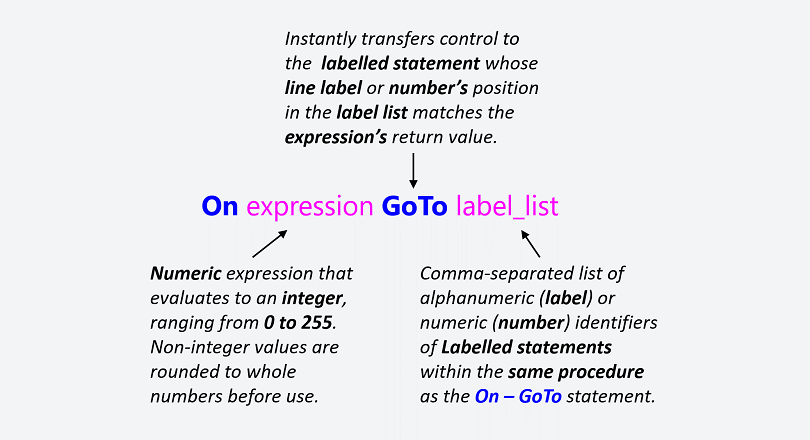
Here, you’ll explore the On – GoTo statement which conditionally transfers control to any labelled statement within the same scope (i.e., procedure).
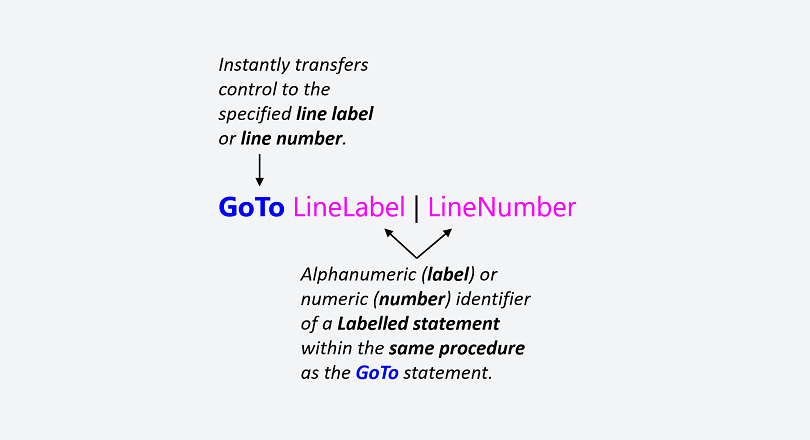
Here, you’ll explore the GoTo statement which unconditionally transfers control to any labelled statement in the same scope (i.e., procedure).

Here, you’ll explore the Call statement which transfers control between procedures and DLLs. It is a VBA jump statement for non-sequential code execution.

Here, you’ll explore the Exit statement which instantly leaves a block. It is one of several VBA jump statements that enables non-sequential code execution.

Expression statements do the heavy lifting in VBA. That is because they are prevalent in typical VBA programs. This article introduces these workhorses.
![The Select Case statement’s syntax. Square brackets, [ ], indicate optional items.](https://masterofficevba.com/wp-content/uploads/2021/03/Select_Case_Statement_Syntaxnew.png)
Most VBA programs feature decision-based execution paths. The Select Case statement is one of two VBA decision statements. So, its exploration is vital.
![The If–Then–[ElseIf]–[Else] statement’s syntax. Square brackets, [ ], indicate optional items.](https://masterofficevba.com/wp-content/uploads/2021/03/If_Then_ElseIf_Else_Statement_Syntaxnew.png)
Most VBA programs feature decision-based execution paths. The If statement is one of two VBA decision statement. So, its exploration is vital.